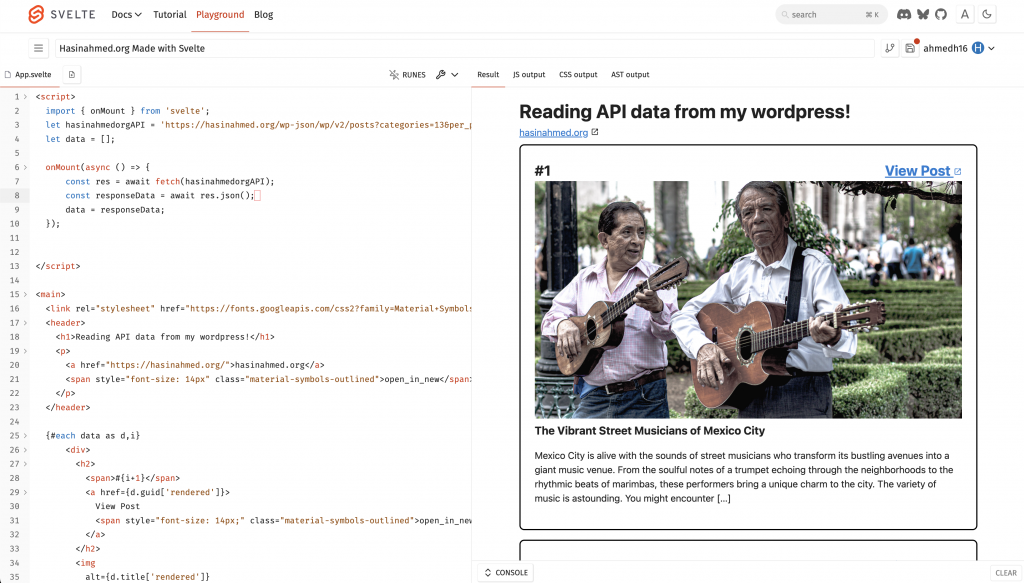
import { onMount } from 'svelte';
	let hasinahmedorgAPI = 'https://hasinahmed.org/wp-json/wp/v2/posts?categories=13&per_page=100';
	let data = [];

	onMount(async () => {
			const res = await fetch(hasinahmedorgAPI);
			const responseData = await res.json();
			data = responseData;
  });


<main>

	<header>
		<h1>Reading API data from my wordpress!</h1>
		<p>
			<a href="https://hasinahmed.org/">hasinahmed.org</a>
			<span style="font-size: 14px" class="material-symbols-outlined">open_in_new</span>
		</p>
	</header>

	{#each data as d,i}
			<div>
				<h2>
					<span>#{i+1}</span>
					<a href="{d.guid[&apos;rendered&apos;]}">
						View Post
						<span style="font-size: 14px" class="material-symbols-outlined">open_in_new</span>
					</a>
				</h2>
				<img alt="{d.title[&apos;rendered&apos;]}" src="{d.yoast_head_json.og_image[0].url}" width="100%" height="400px">
				<h3>{d.title['rendered']}</h3>
				<p>{@html d.excerpt['rendered']}</p>
			</div>
	{:else}
		<div style="background: black">
			<img alt="loading bar" src="https://media3.giphy.com/media/v1.Y2lkPTc5MGI3NjExamt4NXJ2NnVpN2preTR6NGg0dXJvYzBiN2Vub3VldDVoeTloZDY0cyZlcD12MV9pbnRlcm5hbF9naWZfYnlfaWQmY3Q9Zw/ZBQhoZC0nqknSviPqT/giphy.gif">
		</div>
	{/each}
</main>


	* {padding: 0; margin: 0}
	main {
		display: flex;
		flex-direction: column;
		flex-wrap: wrap;
		row-gap: 5%;
		align-content: center;

	}
	div {
		width: 80%;
		max-width:720px;
		border: 2px solid black;
		padding: 24px;
		margin:8px 0px 8px 0px;
		border-radius: 8px;
		overflow: hidden;
	}
	img {
		object-fit: cover;
	}
	h2 {
		display: flex;
		flex-direction: row;
		justify-content: space-between;
	}