HIA

CONNECT

Hasin is a globally-minded multidisciplinary creative technologist & educator based in New York City 🗽.

Drop me a line at hello@hasinahmed.org

Reviews • Services • Packages
Book Exploration Call


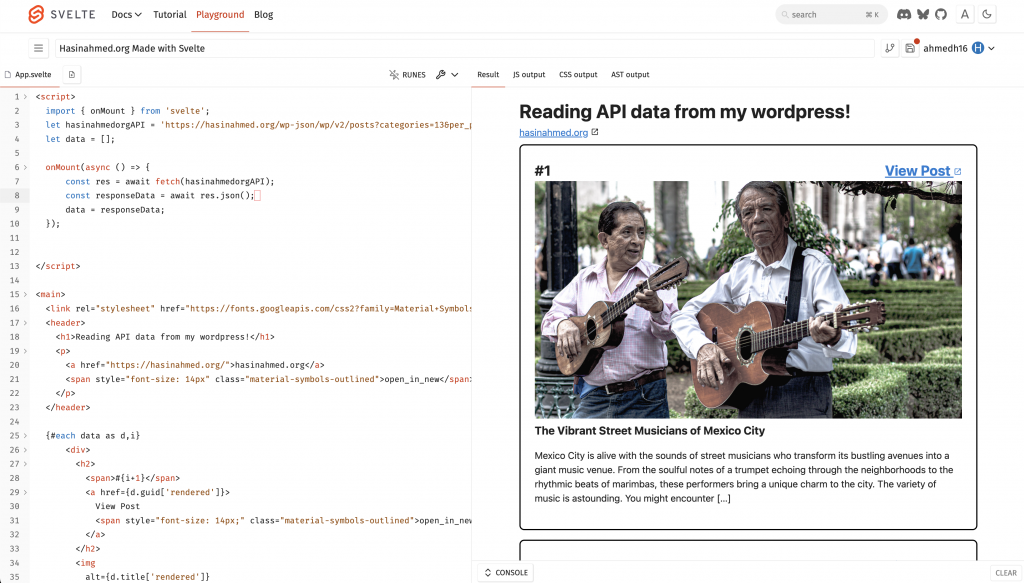
	import { onMount } from 'svelte';
	let hasinahmedorgAPI = 'https://hasinahmed.org/wp-json/wp/v2/posts?categories=13&per_page=100';
	let data = [];

	onMount(async () => {
			const res = await fetch(hasinahmedorgAPI);
			const responseData = await res.json();
			data = responseData;
  });


<main>
	
	<header>
		<h1>Reading API data from my wordpress!</h1>
		<p>
			<a href="https://hasinahmed.org/">hasinahmed.org</a>
			<span style="font-size: 14px" class="material-symbols-outlined">open_in_new</span>
		</p>
	</header>
		
	{#each data as d,i}
			<div>
				<h2> 
					<span>#{i+1}</span>
					<a>
						View Post
						<span style="font-size: 14px" class="material-symbols-outlined">open_in_new</span>
					</a>
				</h2>
				<img src="{d.yoast_head_json.og_image[0].url}" width='100%' height='400px'>
				<h3>{d.title['rendered']}</h3>
				<p>{@html d.excerpt['rendered']}</p>			
			</div>
	{:else}
		<div style='background: black'>
			<img alt='loading bar' src='https://media3.giphy.com/media/v1.Y2lkPTc5MGI3NjExamt4NXJ2NnVpN2preTR6NGg0dXJvYzBiN2Vub3VldDVoeTloZDY0cyZlcD12MV9pbnRlcm5hbF9naWZfYnlfaWQmY3Q9Zw/ZBQhoZC0nqknSviPqT/giphy.gif'>
		</div>
	{/each}
</main>


	* {padding: 0; margin: 0}
	main {
		display: flex; 
		flex-direction: column;
		flex-wrap: wrap; 
		row-gap: 5%;
		align-content: center;
	
	}
	div {
		width: 80%;
		max-width:720px;
		border: 2px solid black; 
		padding: 24px;
		margin:8px 0px 8px 0px; 
		border-radius: 8px; 
		overflow: hidden;
	}
	img {
		object-fit: cover;
	}
	h2 {
		display: flex; 
		flex-direction: row; 
		justify-content: space-between;
	}


Check out the demo here.

				
					SPARKLINE(
    {COUNTIFS($D:$D, "Closed"), (100 - COUNTIFS($D:$D, "Closed"))}, 
    {
        "charttype", "bar"; 
        "color1", "#13734b"; 
        "color2", "#fff"
    }
)


Visualizing dynamic data in Google Sheets becomes more powerful when combining SPARKLINE and COUNTIFS—allowing users to generate real-time progress charts based on filtered criteria. By leveraging COUNTIFS to count specific occurrences and embedding the result within SPARKLINE, users can create mini graphs that update automatically with changing data. This technique enhances quick insights without complex formulas or external tools!

Output